

Release
Energis.Cloud Release 10.3.3: dashboards, data export and weather

On this page
- Multi-asset table sync: one global period and granularity for the table
- Multi-asset table available in report templates, with PDF export
- New export format with assets oriented by column, in CSV and XLS
- Redesigned weather data collection, with a choice of weather station
Release 10.3.3 brings a number of enhancements and new features. They strengthen your dashboards, simplify data export and refine weather data collection in Energis.Cloud.
Multi-asset table synchronisation: simpler period interaction
The new multi-asset table synchronisation makes period interaction in the multi-asset table easier, a common pain point. First, it keeps the core features of its predecessor:
- Asset filtering options for more customisation.
- The ability to include asset attributes directly in the table.
- Comparative analysis against other periods, metrics or column averages.
- Conditional colouring and display of column totals and averages.
- Direct access to alerts, dashboards and external links.
Second, with Multi-Asset Table Sync, you can define a global time period and granularity, and customise how columns are displayed to suit your analysis. You can set each column to show the total of the period with the Aggregate Value option, or to show the values split by the granularity. You can also show both by adding the same metric twice: once with the option ON and once with the option OFF.
Report templates and PDF export
The widget is also available in report templates, with the possibility to export as PDF.
Please note that the print behaviour is optimised for the A4 page size and designed to show up to 14 columns with the portrait report layout option.
The following options are not yet available in the widget and will be added soon:
- Export as CSV.
- Apply peak removal before computing the KPIs.
- Specify the number of decimal digits of the values (the default behaviour applies, namely showing at least 4 significant digits).
Improved data export format: consistent export behaviour
We introduce the ‘CSV (or EXCEL) file (asset oriented by column)’ export format, available in both CSV and XLS variants. This format positions AssetCode/MetricCode pairs in columns, which ensures global consistency across all assets and metrics.
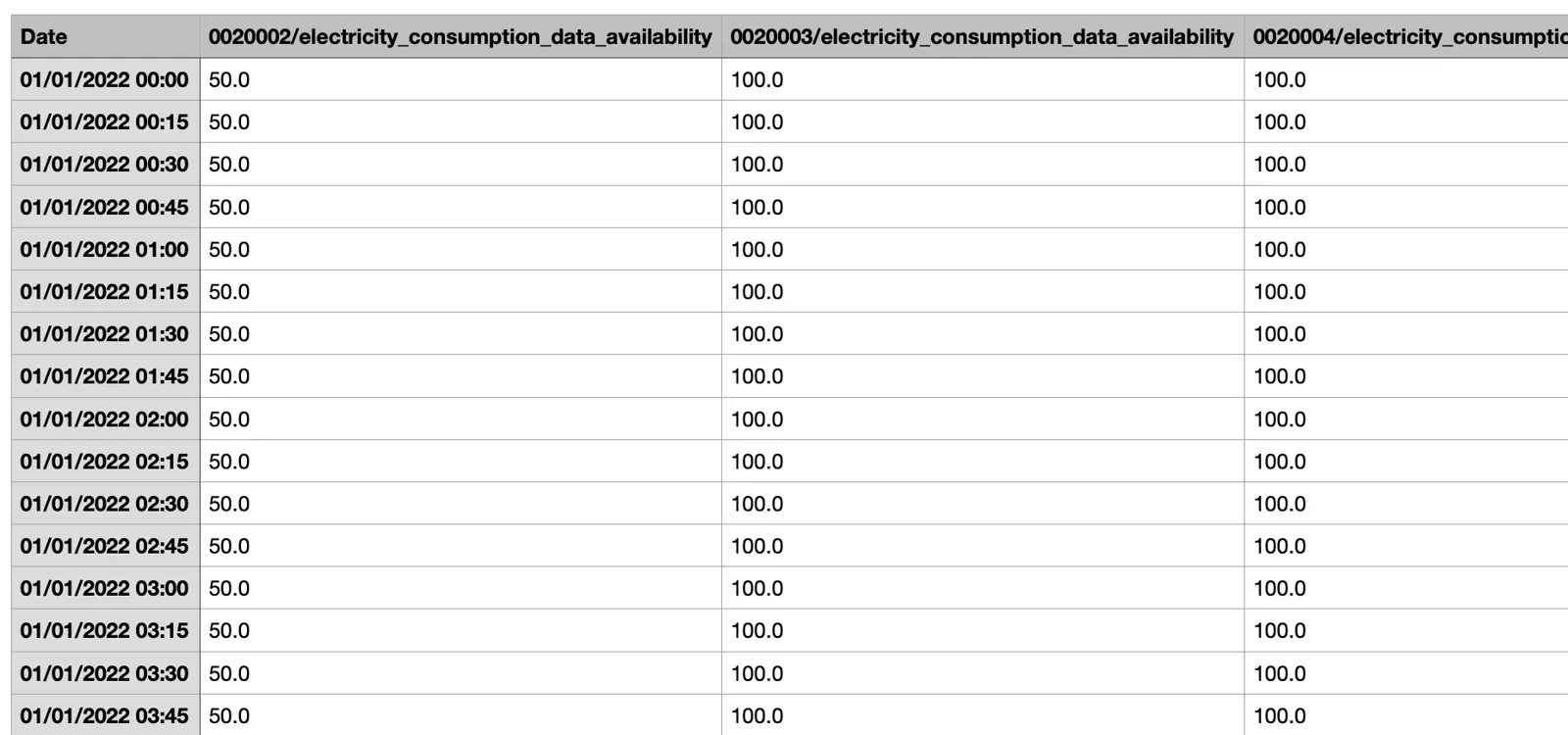 An export in the new format: one row per timestamp and one column per asset code and metric pair.
You can select the new format in the 2nd step of the data export schedule configurator, from the Setup > Data Export menu. The previously available ‘CSV (or EXCEL) file’ format is still available and will be renamed ‘CSV (or EXCEL) file (assets oriented by rows)’.
The export behaviour is now the same across all export options, with a standardised data format. For all export options:
- The date format is, for example, 01/01/2022 00:00.
- There are no quotation marks around any string or numeric value.
- If there is no value for a timestamp, the corresponding cells are null/blank instead of hidden.
The export capacity has been improved
A larger data set (i.e. finer granularity, more assets and/or longer time periods than before) can now be exported. However, no specific volume of data can be guaranteed, as capacity depends directly on the complexity of the calculations required. As a limiting example, a metric may be the calculation of consumption for a portfolio of 10,000 meters: exporting one year of its data would exceed the current capacity, even if it is a single value. Here are some examples of what you can export:
- Electricity, gas, water consumption, 1 YEAR period, DAY granularity, for 100 assets.
- Electricity consumption, 1 YEAR, 15 MINUTES granularity, for 100 assets.
- Electricity, gas, water consumption, 1 YEAR, MONTH granularity, for 500 assets.
CSV exports are more suitable than EXCEL for larger exports (data volume).
For larger exports, such as data for a whole portfolio, contact Energis Support.
Improved weather data collection: better integration and traceability
We have redesigned our weather data collection to work in the same way as the other data collection processes.
For sites already enabled for weather data collection, the data section of the asset edit page is prefilled.
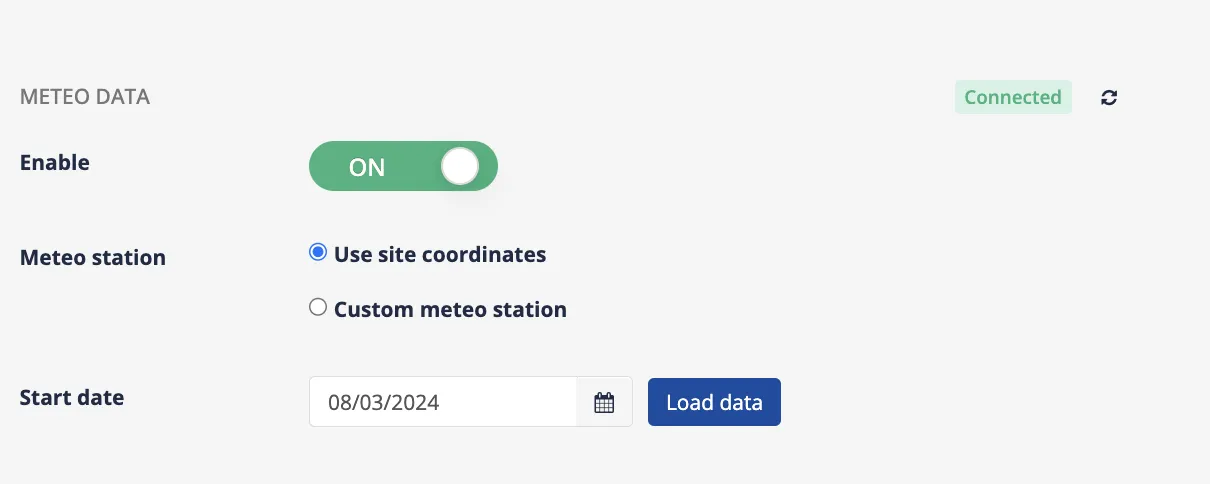 The weather data section of a site: the Connected status, the Enable switch, the choice between site coordinates and a custom weather station, and the start date for loading history.
Integration and traceability
- Connected: weather data is successfully collected. If there is an error in the process, you can see it here with an explanation. You can use the icon to check the status at any time.
- Enable ON: for locations where weather data has been enabled, this flag is ON. Disabling this flag temporarily stops weather data collection.
- Weather Station: by default this is set to ‘use site coordinates’. We have also introduced ‘Custom Meteo Station’: you can now select the exact weather station from which you wish to obtain data. Based on the country selected in the address property, you will see a dropdown list of the available weather stations in that country.
- Start date: by default, the start date is set to 7 days before the deployment date. This means that data collection with the new mechanism starts with the new release. You still keep the history of your weather data.
- Loading data: once weather data is enabled and connected, you can set the start date to request historical data for the given location.
The new mechanism creates a unique data source for each geolocation, so the traceability of weather data is the same as for all other data collection mechanisms. In your data sources page, you can filter the weather data sources by the type ‘Weatherbit’. Their name includes the latitude and longitude.
 The data sources list filtered on the Weatherbit type: one source per geolocation, named with its latitude and longitude.
Impact on the creation of sites via the API
When you create a site where you want to enable weather data, add the following fields to your API request:
"weatherConfiguration": {
  "weatherStationId": null,
  "provider": "weatherbit",
  "historicalStartDate": "2024-01-01"
}
Important to know: weather data collection is limited to:
- Temperature Act.
- Irradiance Act.
- Relative humidity Act.
The following weather data is no longer collected:
- Cloud Cover Act.
- Precipitation Act.
- Pressure Act.
- Visibility Act.
- Wind Direction Act.
- Wind Speed Act.
If you need further assistance, contact Energis Support.
New articles and product updates by email
Guides, customer stories and what is new in Energis.Cloud. You can unsubscribe at any time.
We use your email address only to send these updates. See our privacy policy.