

Release 10.3.2
The 10.3 release focuses on a more fluid navigation overall. For one, we have dramatically improved the responsiveness of the platform. On the other hand, we have improved the period picker for smoother time navigation. We tell you all about it in this release note.
Table of Contents
A new skin for the period picker
Our period selector in dashboards and report templates has been revisited with a new look and smoother user interaction.

It is now better integrated to the setup and the calendar was improved to also show the comparison period. Speaking of which, the comparison periods are now easier to select and come with new options.
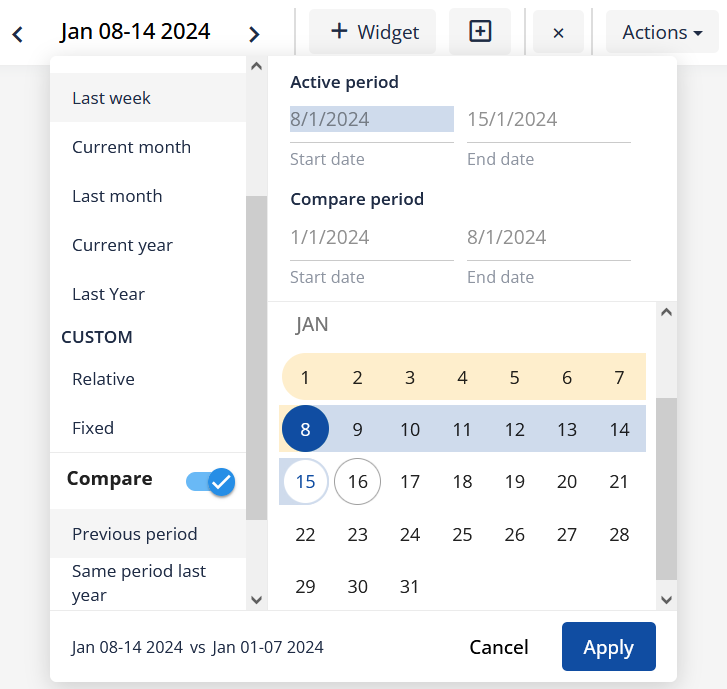
Concretely, on top of the previous comparison options, you can now select among the following:
- Compare with previous period: the period with same length coming just before the selected period;
- Compare with same period last year: the matching period one year before.
These options automatically adapt when modifying the period, even radically.
General speed improvement
Our customers are loading new assets and data to Energis.Cloud everyday a bit more and we thank you for that. The downside of the medal is that all this data ended up impacting the overall fluidity and speed of the system. This is a problem of the past with the 10.3 release. Every major section of the system has been reworked to remove the bottlenecks and restore the navigation fluidity that you deserve.
Also the dashboarding was not left aside. They can now be fully materialized, which means that all the values that you see can be precomputed on a daily base for unbeatable loading times. Ever see a slow dashboard? Let us now and we will speed it up for you.
You want to know how materialized dashboards work behind the scenes ?
In the 10.3.2 release, we have extended the concept to materialize also values about sliding or truncated period (e.g. the total of periods such as “Last 12 months” or “Year to date”). We also added a mechanism to automatically recompute the values every day so that you never have to wait, even the first time that you access your dashboard, and so that the values that you see are always up to date.
As a chery on the pie, reports can now also be generated using precomputed values for a faster on request result.
Miscellaneous
Spatial and inherited links in metrics are back!
You can now navigate metric details and follow the metric dependencies using the links again without interupting your flow when reaching a spatial or an inherited metric.

Filters selection with keyboard
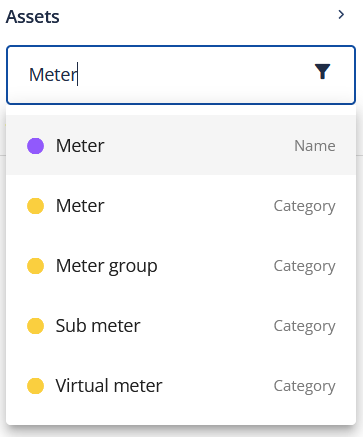
When entering a filter, you can now press the enter key to validate your selection as a “name” filter. You can also use the arrows to select another filter option.
“Go up” arrow always visible
Ever felt lost after clicking the “go into” arrow next to an asset? We now show the “go up” arrow at all times for a better guidance to the full asset tree view.

Data exporter improvement for large data sets
Performances have been improved, allowing exporting larger data sets than before.
Bug fixed
- Navigability tags removed when generating pdf reports
- Data sources: scaling factors not applied with multiple mappings of the same mapping reference
- No automatic horizontal adjustment of widgets when undocking asset tree
- Not possible to enter manual meter readings after deleting Energis metrics
- Not possible to import profile files
- Not possible to add more than 1 tag filter


